The browser as client
decided in direction (decision 26), draft in detail.
A browser doesn’t need a client-side framework to take part in an XTXP session. It already has the three things a client needs, built in:
| The client needs to | The browser does it with | So the muppet sends |
|---|---|---|
| change the document | declarative partial updates | HTML patches aimed at named parts of the page |
| show what changed | CSS view transitions | stable names for every node |
| take input on an element | popovers with anchor positioning | a handle for every selectable element |
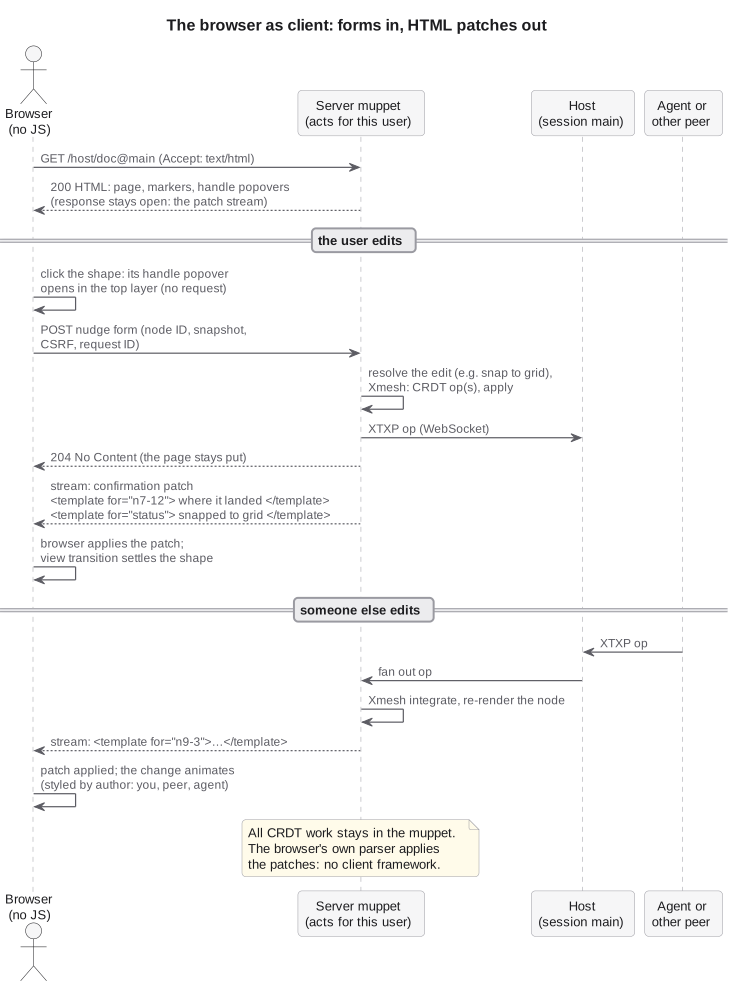
Put together, the browser itself is the muppet’s client. Patches go in, transitions show the change, popovers handle input, and almost no JavaScript sits in between. The muppet does all the CRDT work, exactly as decision 2 says; what changes is that the browser stops being a page that reloads and becomes a live view, applying the muppet’s patches with its own HTML parser.
This idea comes from Schalk Venter’s talk Surprise, it’s server rendering (see North star). The talk named these features as ways to make server-rendered sites feel live. For XTXP they are more than that: they are the client.
Declarative partial updates change the document
Section titled “Declarative partial updates change the document”Declarative partial updates let a page mark places in its HTML with processing instructions, and let later HTML replace what’s there with a <template for>. The browser’s parser applies the patch itself, as the HTML arrives.
HTML patches are the wire format to the browser. When the muppet renders a document, it marks every node it may need to replace, named from the node’s node ID:
<?start name="n7-12"> <rect id="sun" x="40" y="40" width="80" height="80" fill="gold" style="view-transition-name: sun; anchor-name: --n7-12"/><?end>When that node changes, whoever changed it, the muppet sends only its new rendering:
<template for="n7-12"> <?start name="n7-12"> <rect id="sun" x="48" y="40" width="80" height="80" fill="gold" style="view-transition-name: sun; anchor-name: --n7-12"/> <?end></template>The template repeats the marker, so the same node can be patched again. A Yrs update never reaches the browser, and the browser never runs Xmesh: the muppet integrates operations, works out which nodes they touched, and renders just those.
The patch stream
Section titled “The patch stream”The page’s own response stays open. After the first render, the muppet keeps the HTTP response open and flushes a <template for> each time the session changes. With no fetch, no polling and no script, the page stays live. The stream is an enhancement for modern browsers, not a replacement: the <meta http-equiv="refresh"> and 304 Not Modified loop of the no-JS edit loop stays the baseline that works in every browser, older ones included, and the patch stream is what makes it sing where the browser can do it.
Templates are streamed as children of <body>, which lets them reach markers anywhere in the document.
Edits still go in as forms
Section titled “Edits still go in as forms”Edits stay form POSTs, each naming its node, the snapshot it was rendered from and a CSRF token, plus a request ID of the page’s own.
The answer confirms where the edit landed
Section titled “The answer confirms where the edit landed”A POST is a request, not a fact. The muppet may place an edit somewhere other than where it was aimed: an editor snaps a shape to the grid or to another shape, a game world applies its rules (collisions, turns, positions that are taken), a stale edit is rebased onto a newer state, or the grant doesn’t allow it at all. So the answer to every POST is a confirmation: what the edit became, rendered.
- The confirmation is a patch. It carries the node as the muppet resolved it (the snapped position, the move the game allowed) and a short status region saying what happened, such as “Moved to 48, 40, snapped to the grid” or “Not allowed: that square is taken”. The request ID ties it to the POST that caused it.
- With a patch stream, a no-JS browser gets it on the stream. A form POST can’t patch the page it came from without navigating, so the muppet answers
204 No Content, the browser stays on the page, and the confirmation is the next patch on that page’s stream, sent to it ahead of the same change reaching anyone else. A view transition shows the shape settling where it landed. - A page with script can take it as the response. The Wasm muppet, or a few lines of script, can send the form with
fetchand apply the response body, the same confirmation patch, withstreamHTML. - On the baseline loop it’s the redirect. The
303lands on the page as it now stands, with the status region filled in.
One renderer produces every change, the user’s own included; the confirmation is that renderer’s answer to one request.
Coarse or fine patches
Section titled “Coarse or fine patches”- Per node (the default): a marker around every node the muppet may patch, as above. The smallest patches, and the closest match to the operations that caused them.
- Per region: replace a whole region, such as a layer, and let view transitions match old nodes to new ones by name. Simpler to render, and enough for small documents.
Both are the same mechanism; a muppet can mix them.
View transitions make each change visible
Section titled “View transitions make each change visible”A patch that simply swaps one rendering for another makes edits from other people hard to follow: something on the canvas jumps, and you have to work out what. With CSS view transitions, every patch becomes a change a person can watch happen: the shape slides to its new place, the colour fades across, a new element grows in, a deleted one fades out.
Every rendered node gets a stable view-transition-name, so the browser can pair its old and new renderings. The name comes from the element’s own id where it has one, since v1 moves replace a node with a copy and give it a new node ID, and from its node ID otherwise.
Changes are styled by who made them. A view-transition-class says whose change it is (yours, another person’s, an agent’s), so CSS can animate each differently: your own edits settle quickly, and others’ are slower and highlighted in their author’s colour, the same colour the redline uses.
Agents and peers you can follow
Section titled “Agents and peers you can follow”This matters most for edits you didn’t make. An agent is just another peer with a key: its edits arrive through the host like anyone’s, become patches like anyone’s, and animate like anyone’s. Watching an agent move, recolour and add things on the canvas is what makes its work easy to follow, check and trust, rather than a document that silently changed under you.
Navigations animate too
Section titled “Navigations animate too”On the baseline form, redirect and GET loop, cross-document view transitions (@view-transition { navigation: auto; } in CSS) animate from the old page to the new one, with the same names and the same author styling. The baseline looks like the live version, only less often.
Popovers carry the control handles
Section titled “Popovers carry the control handles”To edit an element, a person needs handles on it: move, recolour, delete, edit an attribute. The popover API with CSS anchor positioning gives every element its handles declaratively. The element names itself as an anchor (anchor-name: --n7-12, as in the patch above), and its handle attaches to it:
<button popovertarget="h-n7-12" class="select" style="position-anchor: --n7-12"> Select sun</button><div id="h-n7-12" popover style="position-anchor: --n7-12"> <form method="post"> … nudge, recolour, delete … </form></div>- The handles are the M2 forms, from decision 23, put where the user’s eyes are: attached to the element, not in a list beside the canvas.
- They live in the top layer, so they’re never clipped by the drawing’s
viewBoxor hidden behind other shapes, and they need no positioning code. - Selecting is local. Opening a handle is the browser’s own state, with no request to the host. Like every view, it never changes the session. Light dismiss and one-open-at-a-time come free with
popover="auto". - Handles are patched with their element. When a node changes, its handle popover comes in the same patch, so a handle never offers to edit a stale version.
The select control is itself anchored over its element, sized to it with anchor-size(), so clicking a shape is clicking its button.
Where the browser stops and the muppet starts
Section titled “Where the browser stops and the muppet starts”| Browser | muppet | |
|---|---|---|
| CRDT state, merging, grants | ✓ | |
| Rendering nodes to HTML and SVG | ✓ | |
| Applying patches to the page | ✓ (its parser) | |
| Animating changes | ✓ (view transitions) | names and classes |
| Selection and handles | ✓ (popovers) | renders them |
| Turning an edit into operations | sends a form | ✓ |
The same split holds wherever the muppet runs:
- Server-side, for a browser with no JavaScript: the patches travel in the page’s own HTTP response.
- In the page, as a Wasm muppet (M3): the muppet renders the same HTML patches and applies them with the browser’s own HTML setters (
setHTML,streamHTML), insidedocument.startViewTransition(). No virtual DOM or hand-written DOM code: both muppets share one renderer, and the no-JS view and the Wasm view can’t drift apart. - In a browser that speaks XTXP (north star): the browser’s own muppet has a native way to change the document already.
Support today
Section titled “Support today”“Does this still work with no JS?” stays the test. The meta refresh loop is the baseline every browser gets, and each feature above is a progressive enhancement layered on it:
| Browser | Changes arrive by | Feels like |
|---|---|---|
| Every browser (the baseline) | form POST, 303 redirect, GET, and meta refresh with ETags |
page by page, animated where cross-document view transitions are supported |
| Modern browsers with declarative partial updates (the enhancement) | the patch stream | live, animated |
Handles work the same way: the plain forms are the baseline, and popovers with anchor positioning put them on the element where the browser supports it. Nobody gets a different document, only more or less on screen.
Still open
Section titled “Still open”The platform is close. The first three gaps below are browser gaps, each expected to need a small polyfill now, against the first-class browser support it points to, in the same spirit as the Wasm muppet polyfilling a browser that doesn’t speak XTXP yet (decision 24). A polyfill is a few lines of script, never a framework, and it goes away as browsers catch up; pages without it still work on the baseline.
- Does a streamed patch start a view transition on its own? Today a same-document view transition is started from script, with
document.startViewTransition(). Whether a<template for>patch can trigger one declaratively, or whether that one call is the near-zero JavaScript this design needs, is the first thing to probe. - SVG. Whether markers survive the parser inside inline
<svg>, whether SVG child elements can take aview-transition-nameand act as anchors, and what to do where they can’t: per-region patches, or an HTML layer over the drawing. - Knowing when to stream. Without script, a host can’t feature-detect
<template for>, and a browser that ignores it would sit on a page that never finishes loading. Client hints, an explicit “live” link, or something else. - Rendering safety. Patches carry rendered user content into the page, so the rendering-safety questions apply to every patch, not just the first page.
- Awareness. Whether other people’s open handles and selections are shown, as awareness patched into the page.